Business Object Package Files
Business Object Package file formats encapsulate the following:
Each of these elements can be created specifically for the Package as it is built. Alternatively, an existing Package file can be copied, Interface files and Point definition files can be imported for use from outside sources, or files can be exported for use in related tasks.
|
Click the thumbnail to see an |
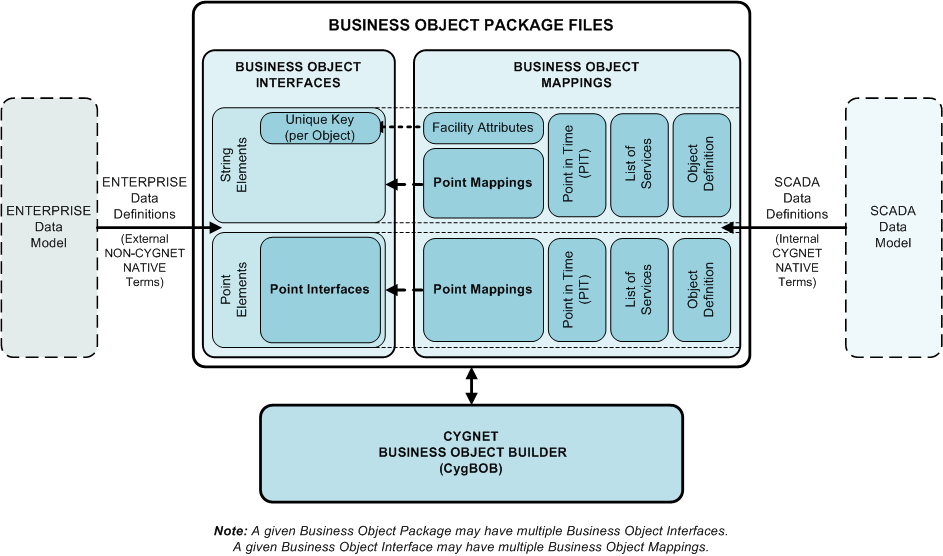
Creating Package Files
To Create a Business Object Package File
- On the CygBOB menu, click the Package tab.
- Click New.
- Type in a name for the new package and click Save.
- Click the Edit tab.
- Create a Business Object Interface.
- Create a Business Object Mapping.
- Create Point Interfaces.
- Create Point Mappings.
- On the Package page, click Open. Navigate to the Package you created and select it. Click Open.
- Verify that the newly created elements are displayed. Click Save.
- If the file has not previously been named, the Save As dialog box will open. Enter the desired file name in the File Name field field and click Save.
Opening, Editing, Copying, and Deleting Package Files
To Open a Business Object Package File
- On the CygBOB menu, click Package to open the Package window.
- On the Package menu, click Open.
- On the Open dialog, navigate to the desired file.
- Click on the file name to select it and click Open, or double-click on the file name, to open it.
- Click OK.
To Edit a Business Object Package File
The elements of an existing Business Object Package File can be edited on the Edit page after opening the package on the Package tab.
To Copy a Business Object Package File
- On the CygBOB menu, click Package to open the Package window.
- On the Package menu, click Open.
- On the Open dialog, navigate to the desired file.
- Click on the file name to select it and click Open, or double-click on the file name, to open it.
- Click Save As.
- Browse to the desired location, and enter the desired name for the new package file.
- Click Save. You can now open and edit the package created.
To Delete a Business Object Package File
- On the CygBOB menu, click Package to open the Package window.
- Click Open, navigate to the package file desired, and right-click to select it.
- Click to select Delete from the drop-down menu. A message will be displayed asking "Are you sure you want to move this file to the Recycle Bin?"
- Click Yes.
More:
 File Import and Export Options


